County Mapper Change Log Page
As technology continues to advance, we strive to update our applications to take advantage of new capabilities and provide a better experience for our users. When changes are made to the County Mapper we will add their details to this change log page. If major changes are planned, we will launch a separate BETA site to introduce them and give you a chance to put them through your paces before we integrate them into the site. Minor changes will likely be introduced in the live application, so this page is a good resource if you notice something different. To gain a better understanding of how these updates or changes affect you the user, we encourage your feedback via the 'Give Feedback' form link or via e-mail from the 'Contact' link both found in the header bar of County Mapper. Your comments and questions will help us to shape the future versions of the County Mapper. The feedback and questions we recieve are posted in the User Feedback page behind the 'FAQs' link.County Mapper Change Log | |||
| Release | Description of Change | Category | Status |
|---|---|---|---|
| 10/05/2025 | In response to underlying changes to the data layer structure, some changes were made to some of the map services. The Champion Trees layer is no longer available in the Environment service because the layer is out of date and no longer maintained by the County. Similarly, the Trails layer from the Public Services tab is being revamped and has been removed until the data is complete. The Voting Places layer has moved from the Service Areas tab to the Public Services tab. A few layers have also had a name change: Hospitals is now Medical Facilities, and Cemetery Preservation Areas is now Cemetery Sensitivity Areas. Parking Lot features are now displayed within the Roadways layer at scales below 1:4800 from the Base Map tab instead of within the Building and Structures layer from the Land Records tab. | Data/Interface | Live |
| 10/05/2025 | Moved the link for PWC Real Estate Assessments information from the Tax Info button to hyperlinked text in the results tab. This enables linking to multiple Real Estate Assessment accounts if a parcel has split assessment.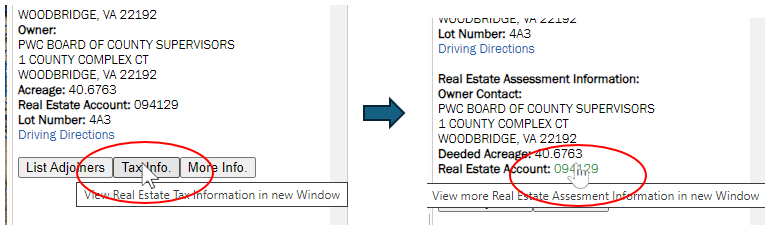 | Interface/Functionality | Live |
| 06/21/2021 | Added "Cemetery Preservation Areas" data layer to the Land Development tab in the Manage Map Layers dialog. This layer shows the approximate locations of cemeteries in Prince William County, Virginia. | Data | Live |
| 11/04/2019 | Fixed bug: Show Parcel Info - hovering over a parcel doesn't show the information pop-up after you use the identify tool. | Functionality | Live |
| 11/04/2019 | When searching for a parcel by GPIN, if a retired GPIN is entered, users will now be presented with the option to select the active decendent parcels instead of the "No parcel found" message. | Functionality | Live |
| 07/08/2019 | Added "Protected Open Space" data layer to the Land Development tab in the Manage Map Layers dialog. This layer shows the boundaries for lands of conservation and recreational interest in Prince William County, Virginia. | Data | Live |
| 07/03/2019 | Fixed bug: Using the Identify tool, the application says there are too many identify layers selected when I only have 1 or 2. Reason: Certain click operations bypassed the functions that correctly enumerated the identifiable layers. These are now handled correctly. | Functionality | Live |
| 07/03/2019 | Fixed bug: More Info button sometimes returns incorrect results. Reason: If multiple features were selected, the geometry used for the More Info spatial queries potentially were misindexed resulting in the wrong geometry getting assigned to the a result record's button. A better index scheme has been implemented to fix this issue. | Functionality | Live |
| 05/21/2019 | Changed the overview map extent ratio so that more of the County is visible around the extent block to give a better overview of where the current map view is located within the County. | Functionality | Live |
| 05/21/2019 | Fixed issue where passed initialization parameters for default layer visibility and opacity were causing error on load. Linking to site from embedded widgets works correctly again. | Functionality | Live |
| 11/30/2018 | Added Zoning Districts as new search in the Features tab of the Search Layers Tool. This allows users to query zoning cases by zoning classification. | Functionality | Live |
| 06/08/2018 | Resolved issue causing Layer Loading Errors in Internet Explorer. This issue was introduced when code was refactored to provide site security improvements (05/09/2018). | Functionality | Live |
| 05/15/2018 | Layer List bookmarks now honor the transparency value settings of the layers set via the Transparency Slider controls. | Cartography/Functionality | Live |
| 05/14/2018 | Updated the symbols used to represent features in the Public Services category for better visibility and standardization. | Cartography | Live |
| 05/11/2018 | Fixed issue with search for certain layers when multiple records are returned. More details now returned to help differentiate the records returned. | Functionality | Live |
| 05/09/2018 | Implemented major code refactor to improve security. Users may need to empty browser cache and reload to avoid errors. | Functionality/Security | Live |
| 02/12/2018 | Issue Resolved: Single and Double-Clicking on the map with the Zoom In or Zoom Out tools active do not change map. Must drag a rectangle to change extent. This has been resolved. Now with the Zoom In or Zoom Out tool active, clicking on the map will again zoom in/out one scale increment and center the map on user click. | Functionality | Live |
| 02/02/2018 | Issue Resolved: Intermittently cannot print if text is added to map with the Draw Text tool. | Functionality | Live |
| 01/30/2018 | Added 1995 Aerial Imagery to the layer options for Aerial Imagery and Swipe Imagery in the Aerial Imagery tab. | Data | Live |
| 01/11/2018 | Reconfigured Aerial Imagery tab and added Swipe control for imagery. Imagery display now controlled by one checkbox and a drop-down pick list containing all imagery layer options instead of Latest Aerial Imagery checkbox and Historic Aerials checkbox with radio button list for imagery year options. The imagery comparison method using the transparency slider on the Historic Aerials layer has been replaced with the Swipe control and the addition of the Swipe Imagery checkbox and drop-down pick list. See help pages for more information on the Swipe function.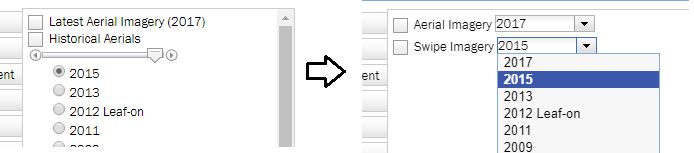 | Interface/Functionality | Live |
| 01/10/2018 | Added 2017 Aerial Imagery as the source behind the Latest Aerial Imagery layer. The 2015 Aerial Imagery was moved to the Historical Aerials as a layer option | Data | Live |
| 10/27/2017 | Added 1991 Aerial Imagery to the layer options under Historical Aerials. | Data | Live |
| 10/25/2017 | Added 1987 Aerial Imagery to the layer options under Historical Aerials. | Data | Live |
| 07/28/2017 | Added 1954 Aerial Imagery to the layer options under Historical Aerials. Mark-up notations are from County real estate assessment business practices of the time and are included for historic significance. | Data | Live |
| 07/28/2017 | Added 1979 Aerial Imagery to the layer options under Historical Aerials. | Data | Live |
| 06/01/2017 | Demographics tab fully removed from the Layers dialog. | Interface | Live |
| 04/10/2017 | Demographics mapping data removed. The new Demographic Mapper has better tools/functions for mapping the demographic data. Traffic Analysis Zones layers moved to the Service Areas tab. | Data | Live |
| 01/18/2017 | Layername changed from LOMA Properties to LOMA Properties/Elevation Certificate in the Environment layer group tab. | Interface | Live |
| 12/07/2016 | Changed the way Identify results are returned for the Demographic data layers. Now if you select more than one feature in one of these layer the results are compiled and returned as a "Summary Record" instead of a return for each feature. This way users can create retrieve demographic data calculated for custom areas. | Data, Functionality | Live |
| 11/30/2016 | Added Demographic data layers at multiple geographic levels for 2010 Census boundaries and 2014 American Community Survey boundaries. These can be found within the Demographics tab of the Manage Map Layers dialog. | Data | Live |
| 10/22/2016 | Added HUBZone Qualified Census Tracts data layer in the Land Development tab of the Manage Map Layers dialog. This layer delineates areas that qualify as "Historically Underutilized Business Zones" according to the U.S. Small Business Administration. | Data | Live |
| 07/01/2016 | Go Live Day! Beta 1.0 version put into production. All below items have been included. | Major Release | Live |
| Beta v1.0 06/28/2016 | Added "Back" capability:  If a search returns multiple features and you select one from the list to examine more closely, there is now a button to return you to the list of previously searched results. If a search returns multiple features and you select one from the list to examine more closely, there is now a button to return you to the list of previously searched results. | Interface, Functionality | Beta |
| Beta v1.0 06/20/2016 | Added default transparency to some of the polygon layers to allow for better display. | Cartography | Beta |
| Beta v1.0 03/28/2016 | Increase scales at which Parcels are visible by 2 zoom levels. | Cartography | Beta |
| Beta v1.0 03/15/2016 | Update Help tab documentation to reflect changes. | Interface | Beta |
| Beta v1.0 03/15/2016 | Add ability to view Pictometry oblique imagery while navigating the map. This is accessed via a new tab in the side panel that loads a Pictometry viewer session into the side panel.  Pictometry viewer extent and zoom level is tied to the extent and zoom level of the map display where possible. This will allow the user to control both panel views by navigating in the map. Center of Pictometry display and viewing direction is tracked on map via a graphic. | Interface, Functionality | Beta |
| Beta v1.0 03/15/2016 | Print function and output layout updated to allow inclusion of Pictometry imagery as an option and to better format the legend and results. | Interface, Functionality | Beta |
| Beta v1.0 03/15/2016 | Standardize information returned by Identify and Search tools. Both methods return the same information about the data features. Includes the Find Adjoiners and More Info functions for the Parcels layer. | Interface, Functionality | Beta |
| Beta v1.0 03/15/2016 | Identify tool highlights geometry/shape of features identified on the map instead of users rectangle or point. | Interface, Functionality | Beta |
| Beta v1.0 03/15/2016 | Add "Zoom to Identified" function. Allows user to zoom to extent of all features currently identified by clicking button in the Results panel.  | Interface, Functionality | Beta |
| Beta v1.0 03/15/2016 | Add "Remove from Results" function. Allows user to 'unselect' an identified feature/record removing it from the results display by clicking button by that record the results panel.  | Interface, Functionality | Beta |
| Beta v1.0 03/15/2016 |
Toolbar makeover. Change the way tools are represented in the toolbar. Reducing the size of the toolbar enables more screen space to be available when resizing the side panels.
|
Interface, Functionality | Beta |
| Beta v1.0 03/15/2016 |
Tool interface makeover. Change the way tool dialogs behave from static to mouse over providing more screen space for information display. Dialogs only opened when changing tool settings instead of tool use duration. Dialogs open when mouse is hovered over tool button in toolbar. Dialogs close when mouse cursor leaves dialog. Tool settings are retained for the
browser session or until user changes them.
|
Interface, Functionality | Beta |
| Beta v1.0 03/15/2016 | Application theme facelift. Change colorscheme and fonts to align with County site themes, add slider between map and the side panel to allow users to resize screen elements within the window. | Interface, Functionality | Beta |
| Beta v1.0 03/15/2016 | In the Public Services tab, change the map symbol for schools from a single color to six colors to differentiate the school type and to align with the symbols of the school boundary layers. | Cartography | Beta |
| Beta v1.0 03/15/2016 | In the Public Services tab, rename the Churches layer to the more accurate Places of Worship. | Cartography | Beta |
| Beta v1.0 03/15/2016 | In the Public Services tab, change the map symbol for schools from a single color to six colors to differentiate the school type and to align with the symbols of the school boundary layers. | Cartography | Beta |
| Beta v1.0 03/15/2016 | Change the map symbols used to display Stormwater Management features in the Public Utilities tab to convey more information visually. | Cartography | Beta |
| Beta v1.0 03/15/2016 | Change display color of the Parcels layer in the Land Records tab so that the features are visible when imagery is turned off. | Cartography | Beta |
| Beta v1.0 03/15/2016 | Add additional leaf-on imagery layers for 2008, 2009, 2012 to Historical Aerial options within the Aerial Imagery tab. | Data | Beta |
| Beta v1.0 03/15/2016 | Change display of Jurisdictions layer in the Base Map tab so that Town areas display in a color easily differentiated from the rest of the County area. | Cartography | Beta |
| Beta v1.0 03/15/2016 | Change display of Topographic Contours in the Base Map tab to show newer data and at more map scales | Cartography, Data | Beta |
| Beta v1.0 03/15/2016 | In the Environment tab removed the superfluous Watersheds data layer. | Cartography | Beta |
| Beta v1.0 03/15/2016 | In the Environment tab grouped the Major Lakes and Rivers, Lakes and Rivers, and Streams layers into one Hydrogaphy layer that is rendered based on map scale. One checkbox to control display of all the water/hydro data. | Cartography | Beta |
| Beta v1.0 03/15/2016 | In the Base Map tab grouped the Major Roads, Streets, and Road Edges layers into one Roadways layer that is rendered based on map scale. One checkbox to control display of all the roads data. | Cartography | Beta |
| Beta v1.0 03/15/2016 | Update to latest api framework version. This will allow access to new functionality. | Technology | Beta |
| Beta v1.0 03/15/2016 | Beta v1.0 Released. | Beta Release | Beta |
 to
to  . Added "Enable Mouse Navigation" option to menu which restores the ability to navigate using mouse clicks and/or roller wheel. Moved "Clear Drawing Graphics" and "Undo Last Drawing" functions from the Draw Tool interface to this menu.
 to
to  .
.  to
to  .
.  to
to  .
.  to Bookmarks tool
  .
.  to
to 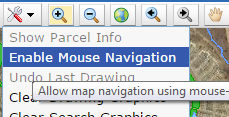 in the Map Tools menu.
  to
to  where the active tool button is highlighted in the toolbar.
 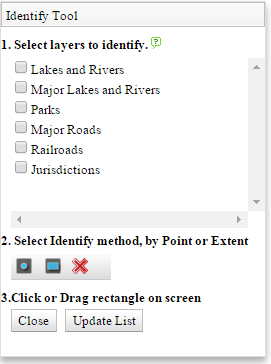 to
to 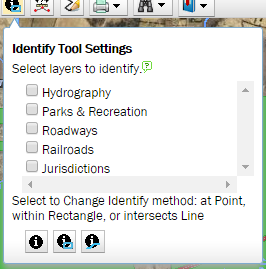 . The list of layers available to identify is updated each time the dialog is opened on mouse over eliminating the need for the "Update List" button.
A new Identify by Line option was added that will return results for any feature that is intersected by the user drawn line. Selecting the identification style (point,line,rectangle) changes the identify tool icon in the toolbar to that selected.
Dialog closes when mouse cursor is moved out of the dialog.
. The list of layers available to identify is updated each time the dialog is opened on mouse over eliminating the need for the "Update List" button.
A new Identify by Line option was added that will return results for any feature that is intersected by the user drawn line. Selecting the identification style (point,line,rectangle) changes the identify tool icon in the toolbar to that selected.
Dialog closes when mouse cursor is moved out of the dialog.
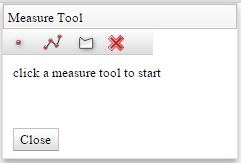 to
to 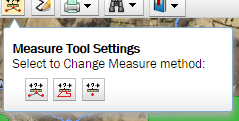 . Choices and result information remain the same. Selecting the measurement style (point,line,polygon) changes the measure tool icon in the toolbar to that selected. Once measurement has been made, the results dialog opens to display results
 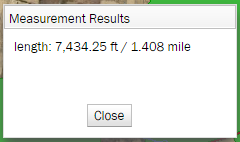 .
.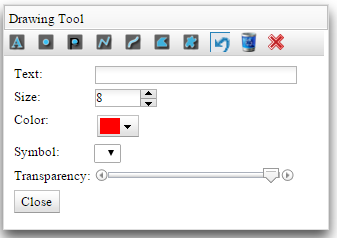 to
to 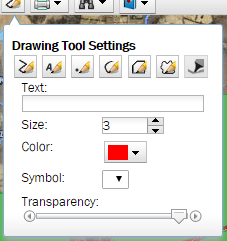 . Drawing method options have updated icons but operate the same way. "Undo Last Drawing" and "Clear Drawing" have been moved to the Map Tools menu to accomodate the settings dialog concept. Size, color, and transparency now apply to all drawing methods. Choosing a drawing method in the settings dialog changes the icon of the Draw Tool in the toolbar to that selected. Dialog closes when mouse cursor is moved out of dialog.